LineStar for FD
- 4.5
- Rating
- 50.00K
- Installs
- Free
- Price

 Analysis by App-foxy
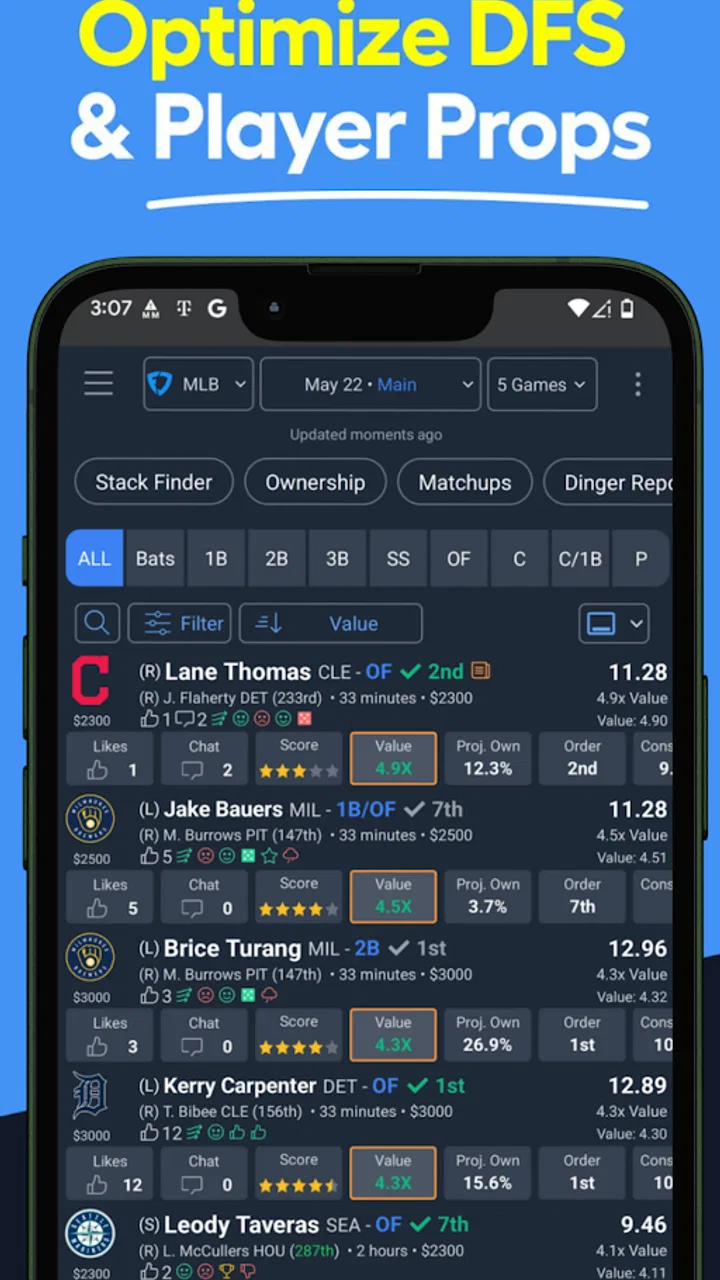
I spent time with LineStar for FD as a sports app built for daily fantasy users who want help making lineup decisions without treating every slate like a full research project. Its focus is practical: projections, strategy guidance, and lineup planning for FanDuel contests. I found it most useful as a decision-support tool rather than a magic lineup button. It can narrow the work, expose choices I might overlook, and give a more organized shape to a rushed pre-game routine.
The app comes from BetFully, Inc. and is free to install, although it includes in-app purchases ranging from $9.99 to $239.99 per item. That distinction matters because the basic download is easy to try, but serious users should decide early how much of the experience they are willing to pay for. It is rated for Teen users, runs on Android 6.0 and later, and the current version is 3.7.0. With an average rating of 4.5 from around 2K ratings and more than 50K installs, it has clearly found an audience among fantasy players.
How LineStar fits into a real fantasy routine
I treat LineStar as one stop in a larger routine, not the place where a fantasy decision is finished. The useful handoff is from its projections and comparisons to my own contest checks, then to the FanDuel entry screen, where I confirm that the idea still fits. That division keeps research focused and makes the next section’s step-by-step flow easier to follow without mistaking a shortlist for a submitted lineup.
You May Also Like

 Pandora - Music & Podcasts
Pandora’s Music Is Easy to Start, but Harder to Recover
Pandora’s strength is its low-effort path from a seed to a station. Its weak spot is how much confidence it asks you to place in connection, setup, and quiet recovery.

 AccuWeather: Weather Radar
AccuWeather Review: A Quick, Clear Forecast for Everyday Decisions
For everyday plans, the best forecast is the one you can understand quickly. AccuWeather makes rain timing, radar, and local conditions easy to act on, with a few trade-offs.

 Hill Climb Racing
Why Hill Climb Racing Still Turns Crashes Into One More Run
A tiny car, a bumpy hill and one more upgrade: Hill Climb Racing keeps resurfacing because its simple chaos makes every near-miss feel personal.

 AliExpress - Shopping App
AliExpress Makes Global Shopping Feel Personal, but Shoppers Bear the Risk
AliExpress turns a global marketplace into a pocket-sized discovery engine. Its reach is useful, its shopping loop compelling, and its trade-offs easy to miss.

 Lords Mobile: Kingdom Wars
Lords Mobile Is a Kingdom-Building Routine, Not a Quick Match
A case-by-case verdict on the building, battles, device demands, and social commitments that make Lords Mobile rewarding for some players and exhausting for others.

 PDF Scanner app - TapScanner
TapScanner Makes Paperwork Easier to Capture, Check, and Share
TapScanner makes scanning with a phone feel less like a rescue operation and more like a dependable step in getting work done. Its capture tools are useful, though not flawless.
More From Our News Desk
View All News


A useful starting point when the slate feels crowded
My first impression was that LineStar works best before I have already committed to a lineup. Opening a fantasy app and staring at a long player pool can create the illusion that every athlete deserves the same amount of attention. A projections-and-strategy tool gives that process a filter. Instead of beginning with a favorite player or a familiar name, I can start by asking which options deserve closer inspection and which ones are probably poor uses of my limited salary and attention.
That is the central strength here. The app is not replacing judgment; it is helping me spend judgment in the right places. I still need to understand the contest, salary structure, injury news, and likely game conditions. LineStar is more valuable when I use it to create a shortlist, compare alternatives, and challenge my first instinct rather than blindly accepting its recommendations.
For someone new to daily fantasy sports, the strategy angle may be more helpful than the raw projections. A number on its own does not explain why a player is attractive, risky, or expensive. A structured approach can teach a beginner to think about balance, opportunity, and lineup construction instead of simply selecting the biggest names. That makes the app easier to appreciate after the novelty of automated suggestions wears off.
Where connectivity becomes part of the experience
LineStar belongs to a category where current information matters. Fantasy decisions are tied to changing player situations, contest timing, and the latest information available before a slate begins. In practice, that means the quality of the experience depends heavily on having a dependable connection when I am reviewing projections and preparing a lineup. A slow connection is not just an inconvenience if I am close to a contest deadline; it can turn a quick check into a stressful series of reloads.
I would not treat it like a notebook that I can casually consult anywhere without planning. The app makes the most sense when I open it in a place with stable mobile data or Wi-Fi, allow myself enough time to review the information, and avoid waiting until the final moments before a contest locks. That is especially important for users who build lineups during a commute, at a stadium, or between work responsibilities.
A realistic everyday scenario is a lunch break before an evening slate. I might open the app, review the available projections, identify a few players that fit the salary range, and compare two possible lineup structures. If the connection is steady, this can turn an unfocused ten-minute break into a useful planning session. If the signal is weak, the same routine becomes less reliable, so I prefer to do the deeper work earlier and use the final check only for confirmation.
Using it on a phone without losing the bigger picture
The mobile format suits the way many fantasy players actually work. I can check an idea while away from a computer, revisit a lineup during a break, or use the app as a second opinion while the official fantasy platform remains open. That convenience is a genuine advantage over relying only on spreadsheets or desktop research. I do not need to rebuild my entire process around a large screen every time I want to test a different player combination.
There is a trade-off, though. A phone encourages quick decisions, and quick decisions are not always good decisions. On a smaller screen, it is easier to focus on one attractive projection and forget the larger contest strategy. I found it better to use LineStar in short stages: first for broad filtering, then for comparing a few candidates, and finally for checking whether the lineup still makes sense as a whole. Trying to do every part of the research in one hurried session makes the tool feel more complicated than it needs to be.
I also recommend separating research from entry. The app can help me decide what I want to play, but the final lineup still needs to be entered and checked in the fantasy platform itself. That extra step is easy to underestimate. A player can look ideal during research and still fail to fit the exact contest, salary limit, or roster requirements I am using. Treating the app as the planning layer prevents that confusion.
What the projections can and cannot do
Projections are helpful because they give me a common reference point. Rather than comparing players through scattered impressions, I can use the app to identify relative value and then investigate the context around it. This is particularly useful when I am unfamiliar with a matchup or when the player pool is too large to evaluate manually.
But projections are not promises. They are estimates, and daily fantasy results are affected by events no planning tool can control. A player can receive the expected opportunity and still produce a disappointing result. Another can exceed expectations because of an unusual game script. I would be uncomfortable using any projection as an automatic answer, and LineStar does not change that basic reality.
The more useful question is not “Which player has the highest number?” but “What does this number make me reconsider?” A projection can reveal that a popular option is expensive relative to alternatives, or that a less obvious player deserves a closer look. That shift in questioning is one of the app’s better educational benefits.
Handling weak signal, interruptions, and recovery
Connectivity problems are most frustrating when they happen during a sequence of decisions. If a page takes too long to load or an update is interrupted, I may lose the thread of why I was comparing two players in the first place. My practical workaround is to keep a simple note of the few candidates I am considering before moving between screens. That way, a failed refresh does not force me to reconstruct the entire thought process.
I also avoid making my final decision while rushing to reconnect. A temporary loading problem can create pressure, and pressure encourages the exact kind of impulsive selection that a strategy app is supposed to reduce. If the app becomes difficult to use close to a deadline, I would rather rely on a previously reviewed shortlist than suddenly chase a new recommendation without checking the details.
That workflow highlights an important limitation: LineStar can support recovery from uncertainty, but it cannot remove the need for a backup habit. I would not depend on it as my only source of last-second information. The sensible approach is to do the main research while the connection is reliable, keep the final candidates clear, and use the app later for a confirmation rather than starting from zero.
Keeping mobile data use under control
For users with limited mobile data, the app deserves a little planning. Sports research naturally involves refreshing information, switching between players, and checking changes close to contest time. I cannot assume that every session will be equally light on data, so I prefer using Wi-Fi for the longer research phase and saving mobile data for brief checks.
This is not only about saving data. A stable Wi-Fi connection also makes it easier to compare options without feeling rushed. I can review the slate, pause to think, and return to a decision without treating every screen load as a race against a weak signal. On mobile data, I keep the session focused: shortlist, compare, verify, then move to the fantasy platform.
Another useful habit is avoiding unnecessary browsing once I have enough information to act. The temptation with projections is to keep searching for a better option forever. That can lead to repeated refreshes and, more importantly, decision fatigue. I get more value from LineStar when I define the question before opening it, such as whether I need a safer option, a salary-saving alternative, or a way to balance a lineup.
Who will get the most from it
I think LineStar is a good match for fantasy players who already understand the basic mechanics of FanDuel contests but want a more disciplined research routine. It can also suit beginners who want a framework for thinking about projections and strategy, provided they are willing to learn instead of copying suggestions without context.
It is especially practical for someone who plays several slates and does not want to build every comparison from scratch. The app can reduce repetitive work and make a mobile-first process more manageable. It is also useful for a player who tends to choose familiar names and wants a tool that challenges those habits with a broader view of the player pool.
I would be more cautious recommending it to someone who plays very rarely, dislikes analytical tools, or expects a guaranteed winning lineup. The paid items may also change the value calculation for casual users. Since the app is free to start but offers purchases from $9.99 to $239.99 per item, I would test the basic workflow first and only spend money if it clearly improves the way I personally research contests.
How it compares with spreadsheets and general fantasy research
A spreadsheet can be more flexible for a highly experienced user who wants complete control over formulas, notes, and historical tracking. It can also be easier to customize around a personal system. The downside is the time required to maintain it and the friction of using it on a phone. LineStar offers a more focused path for someone who wants sports projections and lineup strategy without building the entire structure themselves.
General sports news and fantasy articles provide context that a projection-focused workflow may not. They can help explain injuries, role changes, and matchup details in a way that a number cannot. I would use those sources alongside the app rather than treating one as a replacement for the other. LineStar is strongest at organizing the decision; broader research is still valuable for understanding why a recommendation might make sense.
The official FanDuel experience remains necessary for entering contests and confirming the final roster. LineStar is not a substitute for that step. Its role is closer to a planning companion: I use it to shape an idea, then verify the actual contest details before submitting anything. That division of labor is simple, but it prevents one of the most common mistakes in fantasy apps—assuming research and entry are the same task.
Small workflow changes that improve the results
One of my favorite ways to use the app is to create two or three possible lineup directions instead of searching for one perfect answer. For example, I might begin with a balanced construction, then test a version that frees salary for a premium option, and finally compare whether the cheaper alternatives still look sensible. This makes the projections more useful because I am evaluating trade-offs rather than chasing a single ranking.
A second helpful habit is to review the reason behind every player I keep. If I cannot explain why a selection fits the lineup, I treat it as unfinished research. This catches situations where a player looks attractive in isolation but creates an awkward salary structure or leaves the rest of the roster too fragile. The app supplies a starting point, while the explanation has to come from me.
Third, I use the tool earlier than I think I need it. Waiting until the final minutes makes connectivity, news changes, and decision fatigue collide. Starting earlier gives me time to compare options, step away, and return with a clearer view. That is a simple change, but it improves the experience more than constantly looking for another feature.
My connectivity verdict
LineStar works well as a connected planning tool for daily fantasy sports. Its value is clearest when I have reliable access, enough time to compare projections, and a willingness to apply strategy rather than follow numbers mechanically. The mobile format makes it convenient in everyday situations, but it also makes preparation important because a weak signal or rushed session can undermine the process.
I like that it can turn a large player pool into a more manageable set of decisions, and I appreciate the way it encourages me to think about lineup construction instead of isolated stars. I am less enthusiastic about relying on it for last-second recovery or treating paid features as automatically worthwhile. Casual players should begin carefully, while regular users should judge the app by whether it genuinely saves research time and improves consistency.
Overall, I would recommend it to a fantasy player who wants a focused companion for projections and FanDuel lineup planning. I would skip it if I wanted a fully customizable spreadsheet system, broad sports journalism, or a guaranteed answer. Used with a stable connection, a backup plan, and a final review inside the official fantasy platform, LineStar is a practical addition to a mobile daily fantasy routine.
FAQs for LineStar for FD
01What is LineStar for FD, and who is it designed for?
LineStar for FD is a fantasy sports companion focused on helping users research and manage lineups for daily fantasy contests. It is mainly intended for players who want more information before submitting entries, including projections, matchup context, player trends, and lineup-building guidance. It is not a guaranteed winning system, so users should treat its recommendations as research tools rather than automatic predictions.
02What features does LineStar for FD offer?
The app is built around fantasy sports research and lineup preparation. Depending on the sport and contest supported, users may find player projections, value indicators, matchup information, injury or news updates, lineup tools, and ways to compare potential selections. These features can make research more organized than relying on several separate websites, although the usefulness of the information depends on the sport, contest format, and how current the data is.
03Is LineStar for FD free to download and use?
LineStar for FD may be available to download without an upfront charge, but some tools, advanced statistics, or premium content can require a subscription or in-app purchase. Before using the service extensively, check the current store listing and the app’s subscription screen for pricing, billing intervals, trial conditions, and cancellation rules. Availability and pricing may also vary by platform, region, and supported fantasy sport.
04Does LineStar for FD guarantee successful fantasy lineups or winnings?
No fantasy sports application can guarantee that a lineup will win, and LineStar for FD should not be viewed as a shortcut to guaranteed profits. Projections and recommendations are based on available data and can be affected by late injuries, lineup changes, unexpected performances, weather, and contest competition. Responsible users should review the information themselves, set a budget, and only enter contests where permitted by local laws.
05What should I check before downloading and using LineStar for FD?
Before downloading, confirm that the application supports your device, operating system, preferred fantasy sport, and contest platform. Review its privacy policy to understand what account or usage information may be collected, and check whether location permissions, notifications, or sign-in access are requested. It is also worth verifying recent update activity, customer support options, subscription terms, and regional availability so there are no surprises after installation.
Pros
- Simple interface makes lineup planning quick and accessible.
- Useful for organizing player selections before a match.
- Lightweight app that should run smoothly on most devices.
- Clear presentation helps compare positions at a glance.
- Practical for fans who want a dedicated lineup tool.
Cons
- Limited value if you do not regularly follow the supported sport.
- May lack advanced statistics or detailed player analysis.
- Lineup information can become outdated without frequent updates.
- Small screens may make detailed formations harder to review.
- Some features may depend on an active internet connection.

LineStar for FD
Gallery